Monday, January 9, 2023

java switch statement | Java Tutorial For Beginners

 Switch statement is alternative and more cleaner way to write code if we have more than two options. we can use else if, this is better way. So lets start learning. 

If you want to watch video tutorial for how to use switch statement in java simple click on below tutorial link. 

Java Tutorial Switch Statement in Hindi


For illustration purpose we will use school grade example . we will male program if student get grade A we will print wow great job, if student get grade B we will print good job, if user get grade c we will print you passed, if user get grade f we will print , you failed and for any other grade we will print sorry you not appear . So lets get started. 
First we will declare variable grade, datatype as char. 
After that we will type switch and in the parenthesis we will pass our grade.  and we will add curly brace. Now we will type case A  and will print great job, and add break. It means in the grade if user get A grade then  we will print this statement. Now we will add case B and we will print good job . and we will type break . Now we will repeat for grade C.  Repeat process for grade F and add print statement. now at last we will add default it means any thing which is not mentioned in case , will fall in default and run that block of  code. 
Now in the grade variable assign A as grade and run program. In the result it will run block of Case A similarly try different Cases and check result. 
Switch Statement Java example. 

char grade = 'A';
switch(grade){
case 'A':
System.out.println("Wow great job");
break;
case 'B':
System.out.println("Good Job job");
break;
case 'C':
System.out.println("You Passed ");
break;
case 'F':
System.out.println("You Failed ");
break;
default:
System.out.println("You have not appear... ");

Monday, December 26, 2022

Else if Condition Statement Program | Java Tutorial for Beginners


If there is two condition we use if else but if condition is more than one? well we can use else if. So we will learn how else if condition is used in java with example. If you want to watch video tutorial about how to use else if in Java , below videos are available in English and in Hindi languages. 

Here is scenario 

Write Java program of where if food is warm print out food is perfect , if food is cold print "could you warm please" and for any other option print "I will wait"

Java Else if video tutorial in English


Java Else IF Statement Video Tutorial in Hindi


Now lets create class, 


As we can observe in code we have created class name ElseIF and inside this class we created method name myElseIfMethod . We do not want to return but just would like to print as a result we are using void. In side curly brace we want to write our logic . 

Now lets create variable and data type is string and name of variable is food and we set to warm for now . we will change it later to see how it will be in output. 

Now we will use if condition so we use if and inside bracket we will specify our condition . In last tutorial we used double equal sign to compare and in this tutorial we are using dot equal to as shown in the code.  we are comparing if food is warm then , system will run that block of code which is food is perfect.  

But if food is cold then? we will write different logic for that . Now we will type else if and again in bracket we are specifying condition that if food is cold then we will print out please warm food 

And other than that , we will print out I will wait .  This is how if we have more than two condition we can use else if condition. You can change variable to cold , warm and other and check out put . 

Code 

public class ElseIF {

public void myElseIFMethod(){

String food= "warm";

if(food.equals("warm")){

System.out.println("Food is perfect");

}

else if(food.equals("cold")){

System.out.println("could you warm it please..");

}

else{

System.out.println("I will wait .....");

}

}

Now lets create object in main method . To create object on main method first type name of class then create provide name of variable and then equal sign , new and once again name of class and bracket. If you type variable and dot it will provide you accessible methods , select method which we created, run and check in the output. 

If you want to learn more step by step java tutorial for beginners here is link . 

https://www.youtube.com/channel/UC6nXbd7cjO2QE_pnP81MjTw


Monday, December 19, 2022

If else condition statement | java tutorial for beginners

 In this tutorial you we will learn about how to use if else condition statement . we will use good example to understand how if else statement should created and to use it. If you would like to video tutorial on Java If else conditional statement, below is link in Hindi and English language.

Java If else video tutorial in English 


                                    Java If else video tutorial in Hindi


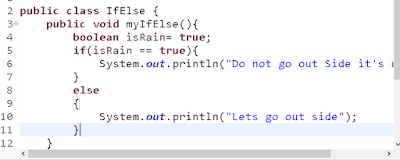
lets create class in Java, As we can see we have created class IfElse and inside we have created non static method and we provide name as myIfElse and  we use void since we are not returning anything. After that we typed bracket and in curly brace we will type our logic.

Scenario:  If it will rain , instruct do not go out side and if it will not rain then print lets go out side . Make Java program using IF Else statement . 

So lets make program . First we created variable and datatype as boolean. we set it as true it means , there is rain.

Now we type if, and we will type bracket next to it, we will provide condition inside. We set isRain == true. when we use = means we are assigning or setting value and if we use == it means we are comparing .  So if there is rain we will run block of code ,which block of code ? it will print "Do not go outside". And if we set our variable to false then it will run "Lets go out side"


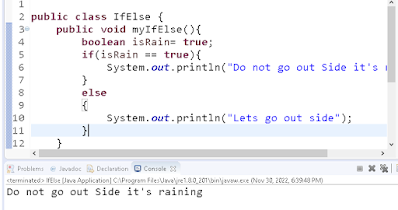
Since we set as true , it will print "Do not go outside code" . Lets check output. Click on Run and check our output.

If you change isRain to false it will run else block.  Hope you understood concept if else in java. If you started learning java , make this kind of simple and easy program it will be fun .  If you want more video tutorial click on this link and watch . 

https://www.youtube.com/channel/UC6nXbd7cjO2QE_pnP81MjTw

Monday, December 12, 2022

Mathematical operations java | Arithmetic operators

 In this tutorial we will learn how to use Arithmetic Operators, Mathematical operations in Java. we will create separate non static methods for each operation like addition, subtraction, multiplication, and division and we call those in main method. If you want to follow along by watching below is link for java basic calculator where we have used arithmetic operation by creating method. Step be Step tutorial is in English and Hindi Language. 

Java Basic Calculator Video Tutorial in English


Java Basic Calculator Video Tutorial in Hindi

For more video click on this link @amazingcodingtechworld


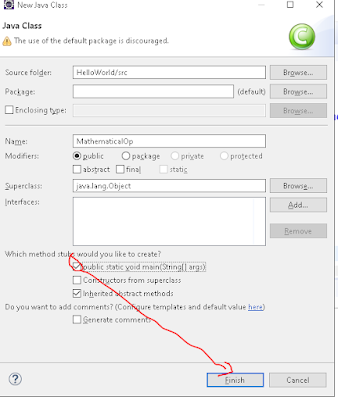
First create class and checkmark on public static void, so we can have main method . 

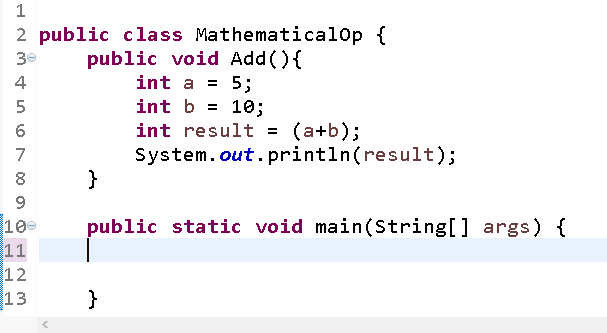
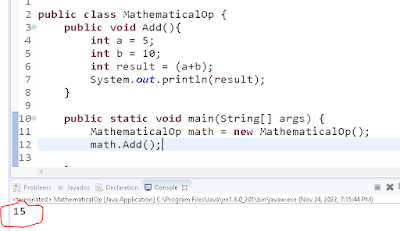
Create method, in this example we created method Add and we use void since we are not returning anything. After method name we use parenthesis and then curly brace where we use our logic inside. we created variable named a and datatype is integer and hold value of 5. After that we have created another variable b which datatype is integer and hold value of 10.  Since we are doing Addition we need result of both number that is why created another variable named result and we adding both number and we are printing it that is why we are using system.out.println as described in below image.  


Now to call method in main class create instance of class . since we are using not static method we have to create instance of class. Syntax is name of class then variable then we use new word and class name then parenthesis. now if you use dot operator after that variable we will get all method which we can able to access. we want to use Add method so lets select it and check in output. we can observe we have result.  


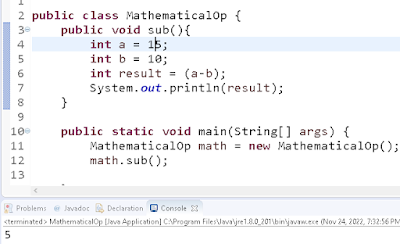
Now lets do Subtraction by creating non static method,  we have created method and created variable , a, b, and result . All have data type as integer and we are calling in main methods. 


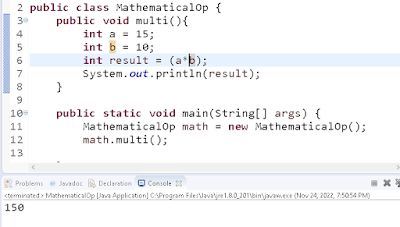
Now lets try out multiplication everything is same but in the result variable we have just changed operation.


 Now we are doing last operation, division. so we are doing same thing created three variables and calling in the result we have changed operation we are doing division and we are calling method in main .


Monday, December 5, 2022

How to create method and call in Java | Java Programing Tutorial for Beginners

 In this java tutorial we will learn about how to create method and call method with example step by step . If you have any doubts  you can watch java tutorial  which is in English and Hindi languages.

    Create method and call in Java in English Video Tutorial

    Create method and call in Java in Hindi Video Tutorial

For more video click on this link  @amazingcodingtechworld
Lets create class and and check mark on public static void so it will create main method, where we  will call .


public class JavaMethod {

public static void main(String[] args) {
// TODO Auto-generated method stub

}

}
Now will  create method in side class called Java method. 


we have created myMethod and we use void since we are not returning anything and when we create method we give parenthesis() at will provide curly bracket .   Inside out curly bracket we have out logic in this case we want to print "hello.....my method"
now to call this , in the main method we have to create instance of our class.  so syntax is name of our class then provide variable name which is instance of our class and =  new and provide class name. Now we have instance of our class now we can use it. if we type that instance and use dot operator we can access method inside our class and we can see out put as described in picture. This is how you use to create and call non static method. If you want to create static method you simple type name of method in main class. 


Monday, November 28, 2022

How to learn Data type | Java Tutorial for beginners

 In last tutorial we learn how to create class in eclipse and print hello world program. Now in this tutorial we will learn Java Data type step by step by practical example. 

Like other languages java has different data type, context is same but there may be change in syntax  and we will learn them one by one.  

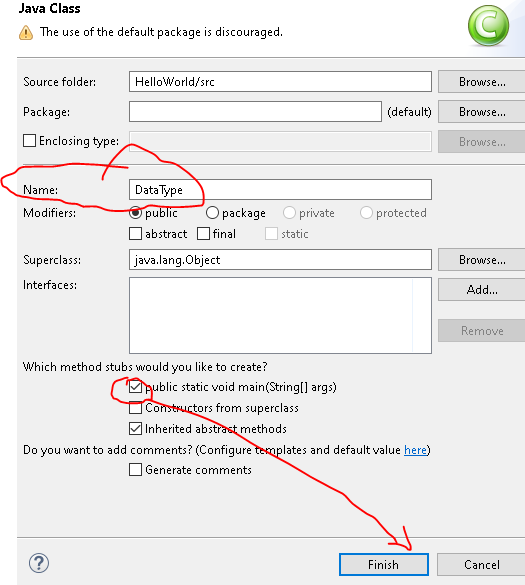
Lets create class, It the src folder right click and click on new provide name in this example we give name as datatype . checkmark on public static void main so it i will create main method in our class. and click on Finish. 

Now check in editor , we can observe we have class name data Type and we have main method , we can ignore comment or remove it. If you want to learn by watching here is link of step be step video tutorial data type Java program for beginners in Hindi and English language. Please click on link.

Java Data Type Tutorial Video in English 

Java Data Type Tutorial Video in Hindi


Data Type: 

java Integer

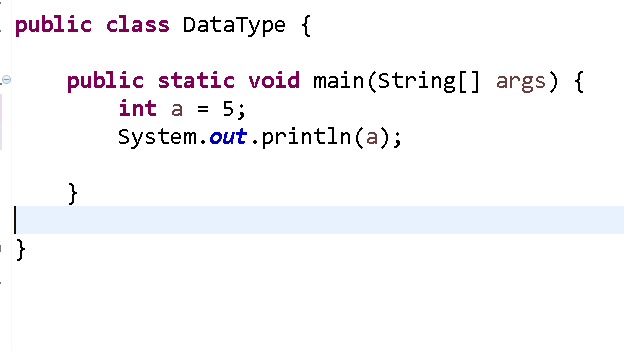
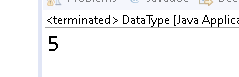
In java we have to let system know what type of data type are we using. Lets start with int. we create variable , which hold data , so we will type int and we created variable name a and we store value of 5. so what is cool about variable every time we change value we do not have to change else where , we just use variable because it holds value. As we observe in below picture what would be output in console? you get it . it's 5 . click on green error button (Run) . but before that make sure you have saved it.  

Console out put

Now what if you change a =10 and rerun program, what would be output? yes it would be 10. 

Java Double

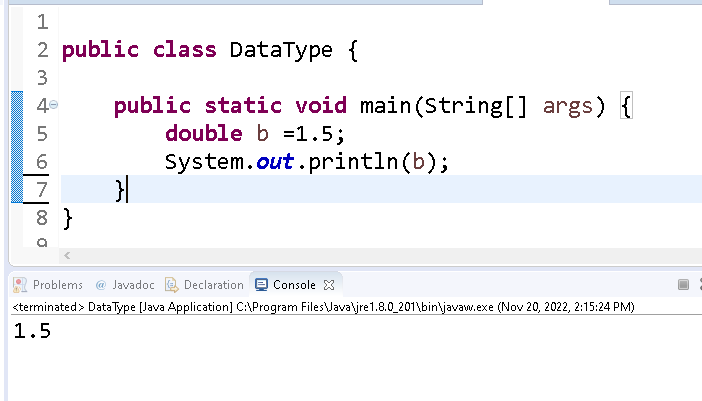
Now lets create another variable b , and set datatype integer and assign value as 1.5 (int b = 1.5) . Hmmm now we get error message now either we have to cast or we have to change type now change datatype as double instead of int , now you can see error is gone . it means if number is not whole we like 1.5 we should use double . now run program you will get out put as shown in below image


Java Character
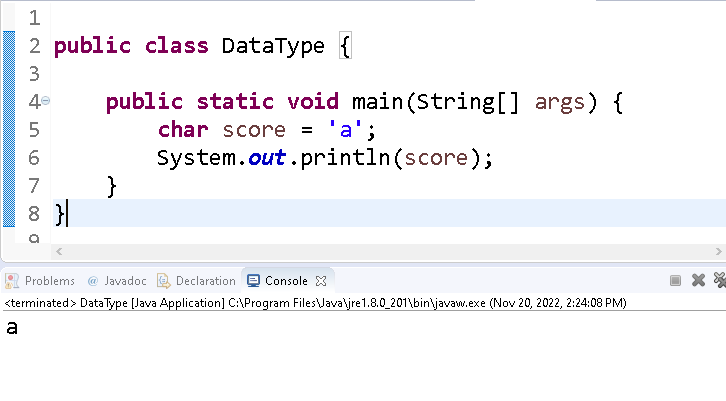
Now it is correct time to introduce char, what would be best example? if teacher gives score to student like a, b, c ,d, f. we can use data type as char as describe in example , save it and Run. 
Java String


If we would like to use sentence and would like to print it what datatype should we use? Answer is String lets see how to use string in java
we will type String as data type and we create variable which hold some kind of value and we assign as = sign. but unlike char we will use double quotation in string while in char single. In below example we created variable name and type of string which hold value(John) now save , run and observe in console. we get our correct value. 

Java Boolean
Now we will learn Boolean . Boolean is true or false. And we can use boolean to declare value. In this example we have set boolean as true and we printed in console. 
Why we have so many data types?
well these are not only the type there are byte, short, long, float etc . All have different size and capacity. If it is byte it would be size of 1 byte and can store whole number from -127 to 127. If we use short it will take 2 byte and we can store whole number from -32768 to 32767. If we use in as data type it will take 4 byte and can store number -2147483648 to 2147483647, for long it will take 8bytes and can store value from whole number -9223 372 036 854 775 808 to 9223 372 036 854 775 807.Now you can understand we can use same datatype for multiple thing but it will take more memory , that is why it is important to use wisely . 
hope you like this tutorial if you would like to know more, please click on below link.
https://www.youtube.com/@amazingcodingtechworld 

Monday, November 21, 2022

How to write Hello World in Java?|Java Tutorial for beginners

 If you are new to any language we start with Hello World which is first step of learning . 

If you have any drought or confusion there is step by step video tutorial in Hindi as well as in English  about  to start to learning Java by creating simple program of Hello World . 

Pre-condition is first download code editor , like Eclipse https://www.eclipse.org/downloads/ . which will ease your work. Also you have to download Java based on your computer system.  https://www.oracle.com/java/

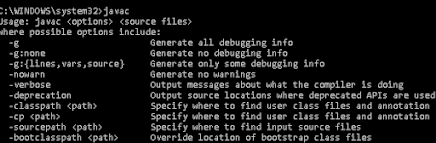
Make sure you set Environmental variable . Or open command prompt by typing cmd in search bar. now type javac if you have few option as below it means you have set up correctly. there are lots of video about how to set up so you can follow that. 

Video In English 


Video In Hindi


open Eclipse or any code editor and click on File then Click on New


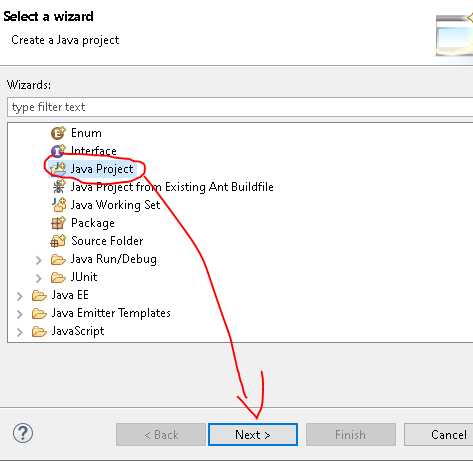
Now try to find java project if you can not find then select other project and type java and click on Java project , click on next

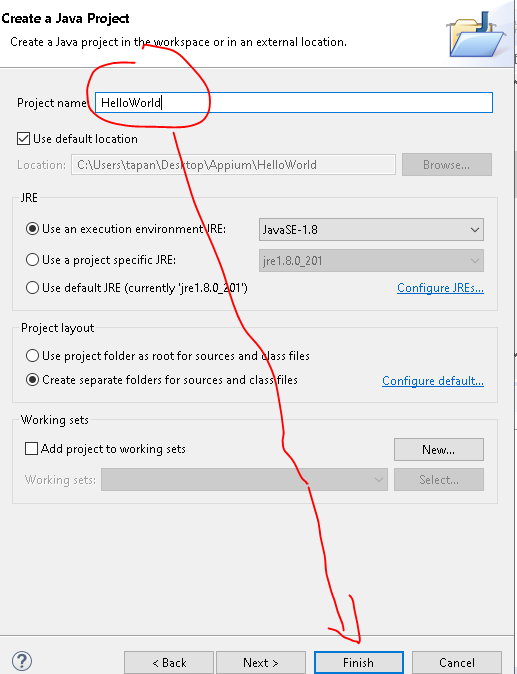
Enter name of Project and click on Finish


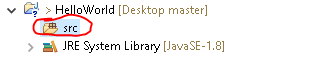
Now expand new created project and Right click on SRC, then New and Class.


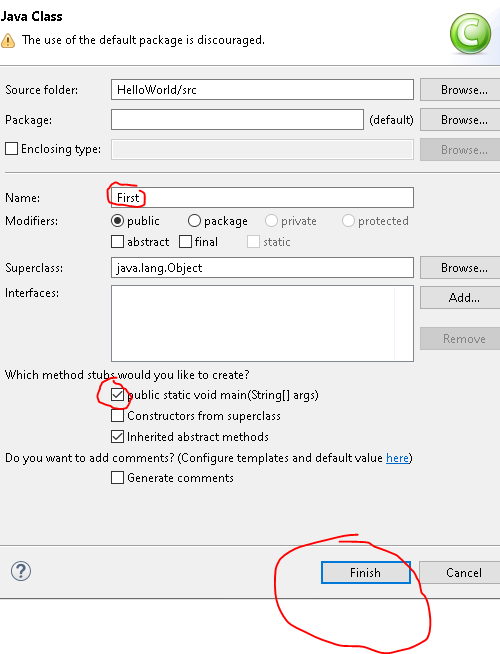
Enter class name , and check mark on public static main and click on Finish. 
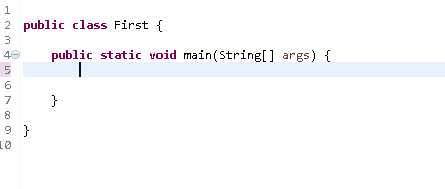
Since we have check mark on Public static main system will create class with main method .
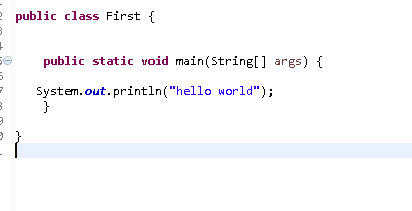
Now for print in console in Java we will type system.out.println and in brace we will type hello world since it is string will use string and semicolon after code which is compulsory in  java. Make sure we will save , use control  + S . 

Now Click on Run and select First from drop down which is out class name if you have given something else make sure you select that name now check console. 

Congratulation we have our first program of Hello World. 


Monday, July 4, 2022

How to print JavaScript table in reverse order program Programmatically

 If you want to print table in JavaScript here what you can do . In this example we going to print table of 8 programmatically . below is explanation and at end of explanation you will get code 

Step no 1 

lets declare variable j =8 ;

since we want to print  table of 8 

Step no 2

user while loop or for loop

since it is in reverse order our starting point is 10 , we will run loop until i reach to 1 and i-- mean i =i-1 so we will not going to increment instead we will decrement by one . so in our case loop start with 10 and check if i is greater than one , it will loop until i reach to 1.

Document .write is used for print or observe in browser if you want to use console you can simple replace console.log

now we use variable j which we store value (in this case 8) and we we use i it means it will print position of i and at last we are using j*i it means value of j is 8 and times position of i until value of i reaches to i . 

if you want to print table of 10 in reverse order simple change value of j to 10. Below is code and out put.  

                                                                     Code:

<script>
       
     j = 8
    for(let i=10;i>=1;i--){
     
        document.write(`${j} times ${i} is ${j*i}<br>`)  
        console.log(`${j} times ${i} is ${j*i}`)      
    }

</script>

 -                                                                      out put:


Saturday, March 26, 2022

App Privacy Policy

**Privacy Policy**


Guruji Guru built the General Knowledge Quiz app as a Free app. This SERVICE is provided by Guruji Guru at no cost and is intended for use as is.


This page is used to inform visitors regarding my policies with the collection, use, and disclosure of Personal Information if anyone decided to use my Service.


If you choose to use my Service, then you agree to the collection and use of information in relation to this policy. The Personal Information that I collect is used for providing and improving the Service. I will not use or share your information with anyone except as described in this Privacy Policy.


The terms used in this Privacy Policy have the same meanings as in our Terms and Conditions, which are accessible at General Knowledge Quiz unless otherwise defined in this Privacy Policy.


**Information Collection and Use**


For a better experience, while using our Service, I may require you to provide us with certain personally identifiable information, including but not limited to name, email address, contact address, query , feedback . The information that I request will be retained on your device and is not collected by me in any way.


The app does use third-party services that may collect information used to identify you.


Link to the privacy policy of third-party service providers used by the app


*   [Google Play Services](https://www.google.com/policies/privacy/)

*   [AdMob](https://support.google.com/admob/answer/6128543?hl=en)

*   [Google Analytics for Firebase](https://firebase.google.com/policies/analytics)

*   [Facebook](https://www.facebook.com/about/privacy/update/printable)

*   [Appodeal](https://www.appodeal.com/home/privacy-policy/)

*   [Unity](https://unity3d.com/legal/privacy-policy)

*   [AppLovin](https://www.applovin.com/privacy/)

*   [StartApp](https://www.startapp.com/privacy/)

*   [AdColony](https://www.adcolony.com/privacy-policy/)


**Log Data**


I want to inform you that whenever you use my Service, in a case of an error in the app I collect data and information (through third-party products) on your phone called Log Data. This Log Data may include information such as your device Internet Protocol (“IP”) address, device name, operating system version, the configuration of the app when utilizing my Service, the time and date of your use of the Service, and other statistics.


**Cookies**


Cookies are files with a small amount of data that are commonly used as anonymous unique identifiers. These are sent to your browser from the websites that you visit and are stored on your device's internal memory.


This Service does not use these “cookies” explicitly. However, the app may use third-party code and libraries that use “cookies” to collect information and improve their services. You have the option to either accept or refuse these cookies and know when a cookie is being sent to your device. If you choose to refuse our cookies, you may not be able to use some portions of this Service.


**Service Providers**


I may employ third-party companies and individuals due to the following reasons:


*   To facilitate our Service;

*   To provide the Service on our behalf;

*   To perform Service-related services; or

*   To assist us in analyzing how our Service is used.


I want to inform users of this Service that these third parties have access to their Personal Information. The reason is to perform the tasks assigned to them on our behalf. However, they are obligated not to disclose or use the information for any other purpose.


**Security**


I value your trust in providing us your Personal Information, thus we are striving to use commercially acceptable means of protecting it. But remember that no method of transmission over the internet, or method of electronic storage is 100% secure and reliable, and I cannot guarantee its absolute security.


**Links to Other Sites**


This Service may contain links to other sites. If you click on a third-party link, you will be directed to that site. Note that these external sites are not operated by me. Therefore, I strongly advise you to review the Privacy Policy of these websites. I have no control over and assume no responsibility for the content, privacy policies, or practices of any third-party sites or services.


**Children’s Privacy**


These Services do not address anyone under the age of 13. I do not knowingly collect personally identifiable information from children under 13 years of age. In the case I discover that a child under 13 has provided me with personal information, I immediately delete this from our servers. If you are a parent or guardian and you are aware that your child has provided us with personal information, please contact me so that I will be able to do the necessary actions.


**Changes to This Privacy Policy**


I may update our Privacy Policy from time to time. Thus, you are advised to review this page periodically for any changes. I will notify you of any changes by posting the new Privacy Policy on this page.


This policy is effective as of 2022-03-26


**Contact Us**


If you have any questions or suggestions about my Privacy Policy, do not hesitate to contact me at gurunew0@gmail.com.


This privacy policy page was created at [privacypolicytemplate.net](https://privacypolicytemplate.net) and modified/generated by [App Privacy Policy Generator](https://app-privacy-policy-generator.nisrulz.com/) 

Tuesday, January 25, 2022

How to print numbers in ascending order by using for loop and while loop| JavaScript

 If you are learning JavaScript, these simple program like how to How to print numbers in ascending order by using for loop and while loop? is very helpful . You can understand how actually loops works by these program.

Lets Start how to make print 1 to100 by using two way for loop and while and loop

Let's start with For loop

Step 1 Create Function

function dec() {

}

Step 2 inside function use for loop 

Step 3 call function dec()

 for(let k=1k<=50k++){
            
                console.log(`Even number is ${k}`)
            }

Video Source 

In English


In Hindi


Now lets understand logic. 

First we write for and then inside () we write our logic.

first we declare our variable as K and since we want to print number from 1 it is our starting point.

Now we want to specify our condition since when loop will work , in this case our k is not reach to 50.  and k++  means every time will add one. In other word k = K+1 but k++ is short form. 

So in this case k start with 1 and check with the condition that K is less than or equal to 50? in this case yes so next step will console our statement and then it will add 1. So now K becomes 2 , and loop going on until it reach to 51 and it breaks. 


        function dec(){
            for(let k=1k<=50k++){
            
                console.log(`Even number is ${k}`)
            }
        }
dec()


Now we understand with While loop 

 Syntax of while loop is little different

Step 1 first we declare variable 

let i = 1

Step 2 now  specify condition 

while (1<=50) 

then {

{

and inside console.log (i) and main important thing do not forget i++other wise loop will not end .

      function dec(){
            let k = 1;
            while(k<=20)
           {
             
            console.log(k)
             
              
               k++;
           }
           
        }

dec() 


Sunday, January 9, 2022

How to make JavaScript projects or app?

This blog is for you if you want to make JavaScript project or app. 
I will also add video in English as well as in Hindi . I will also add source code . 
Basically we are making 3 apps.


1. Mile to KM Convertor JavaScript App or Project 
 App is Conversion App where you can convert miles to Km.by taking this project as reference you can make currency convertor ,Feet to Inches Convertor, KG to LB and many more. Just change formula. 
Also in this app there is custom error message where if user does not enter any Value , user will get custom error message. And as soon as user enter value , error message will go away ,and app will convert mile to km. 
In this  app you will learn few concept of HTML, CSS ,  and variable ,IF else statement , DOM (Document Object Model concept) from JavaScript step by step. 
Source Code

<!DOCTYPE html>
<html lang="en">
<head>
    <meta charset="UTF-8">
    <meta http-equiv="X-UA-Compatible" content="IE=edge">
    <meta name="viewport" content="width=device-width, initial-scale=1.0">
    <title>App</title>
    <style>
        #container{
            height: 400px;
            width: 400px;
            border: 3px solid rgb(51, 4, 4);
        }
        h1{
            text-align: center;
        }
        input{
            background-color: blue;
            color: white;
            width: 90px;
            height: 50px;
            font-size: x-large;
        }
        button{
            height: 40px;
            width: 100px;
            margin-top: 10px;
            margin-left: 100px;
            background-color: rgb(56, 6, 6);
            color: white;
            font-size: large;
        }
  #error{
      color: red;
  }

    </style>
</head>
<body>
    <div id ="container">
        <h1>Mile to KM</h1>
       <h4><span id= "error"></span></h4>
        Mile<input id="mile" type ="text">
        KM:<input id= "km" type ="text"><br>
        <button id ="submit" > Submit</button>
    </div>
   

 <script>
newmile= document.getElementById("mile")
newkm= document.getElementById("km")
newerror= document.getElementById("error")
newsub= document.getElementById("submit")
newsub.addEventListener("click",function(){
    if(newmile.value===""){
        newerror.innerText="Please enter value"
    }
    else{
        newerror.innerText=""
        newkm.value=newmile.value*1.609344
    }
 
})
 </script>

   
</body>
</html>


2. JavaScript Quiz App / Project
In app you will learn how to make JavaScript simple quiz by using JavaScript library jQuery. In  video CDN method has used . Where if user click on Hide button, All Answer will be hide and as soon user click on show method Answer will be shown to user.  Also there is another way in jQuery if you use toggle in build method then on one button user can hide and show answer . Hide, show and toggle jQuery method is used. 
  Source Code
<!DOCTYPE html>
<html lang="en">
<head>
    <meta charset="UTF-8">
    <meta http-equiv="X-UA-Compatible" content="IE=edge">
    <meta name="viewport" content="width=device-width, initial-scale=1.0">
    <title>Quiz</title>
    <style>
        #box{
            height: 400px;
            width: 500px;
            background-color: dodgerblue;
            margin-left: 20px;
            text-align: center;
            border: 2px solid black;
            color: white;
        }
        p{
            color: red;
            font-size: x-large;
            font-weight: bold;
        }
        #hide{
            height: 30px;
            width: 50px;
            color: white;
            background-color: red;

        }
        #show{
            height: 30px;
            width: 50px;
            color: white;
            background-color: green;

        }
        #to{
           
            height: 30px;
            width: 50px;
            color: white;
            background-color: rgb(6, 14, 6);

       
        }

    </style>
</head>
<body>
    <div id= "box">
        <h1>QuizApp</h1>
        <h3>1. What is 2 + 2?</h3>
        <p>4</p>
        <h3>2. What is 2 - 2?</h3>
        <p>0</p>
        <h3>3. Where is Mumbai </h3>
        <p>India</p>
        <button id ="hide">Hide</button>
        <button id ="show">Show</button>
        <button id ="to">Toggle</button>
    </div>
    <script src="https://code.jquery.com/jquery-3.6.0.min.js" integrity="sha256-/xUj+3OJU5yExlq6GSYGSHk7tPXikynS7ogEvDej/m4=" crossorigin="anonymous"></script>
    <script>
        $(document).ready(function(){
         $("#hide").click(function(){
             $("p").hide();
         })
         $("#show").click(function(){
             $("p").show();
         })
         $("#to").click(function(){
             $("p").toggle()
         })
       
        })
    </script>
</body>
</html>

3. Lotto App
In this JavaScript app, computer will generate 3 random number if user click on button . Math.floor and Math.random method used in this all to generate random number. In this tutorial you will get hint of how to use and call JavaScript function and how to use console to making sure if logic is correct. 
 Source Code
<!DOCTYPE html>
<html lang="en">
<head>
    <meta charset="UTF-8">
    <meta http-equiv="X-UA-Compatible" content="IE=edge">
    <meta name="viewport" content="width=device-width, initial-scale=1.0">
    <title>Lotto</title>
    <style>
        #container{
            height: 500px;
            width: 500px;
            border: solid 2px black;
            text-align: center;
        }
        input{
            background-color: blue;
            color: white;
            height: 100px;
            width: 100px;
            text-align: center;
            font-size: xx-large;
            font-weight: bold;
            margin-top: 10px;
        }
        button{
            height: 80px;
            width: 80px;
            margin-top: 10px;
            font-size: larger;
            background-color: green;
            color: white;

        }
    </style>
</head>
<body>
    <div id ="container">
        <h1>LottoApp</h1>
        <input id ="one"type="text">
        <input id ="two" type="text">
        <input id = "three"type="text"><br>

        <button id = "submit">Click</button>
    </div>

    <script>
        num1= document.getElementById("one")
        num2= document.getElementById("two")
        num3 =document.getElementById("three")
        sub =document.getElementById("submit")
        sub.addEventListener("click", function(){
            one()
            two()
            three()
        })
        function one(){
            num1.value=Math.floor(Math.random()*10)
        }
        function two(){
            num2.value=Math.floor(Math.random()*10)
        }
        function three(){
            num3.value=Math.floor(Math.random()*10)
        }
       

    </script>
</body>
</html>

Video Source :
                                                      In English Language


                                                           In Hindi Language 


java switch statement | Java Tutorial For Beginners

 Switch statement is alternative and more cleaner way to write code if we have more than two options. we can use else if, this is better way...